Problem 5 of 10
Move them to Flow before something breaks
Are your approvals, renewals and follow-ups running on tools Salesforce no longer supports?
Many automations still run on retired tools. If one breaks, Salesforce won’t fix it, and you may only notice when a renewal is missed.
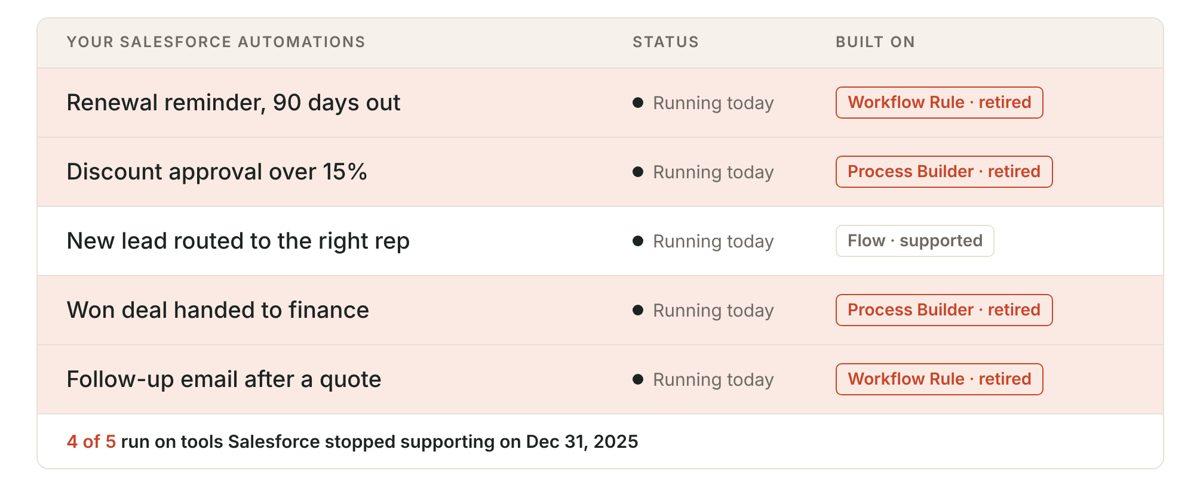
Somewhere in your Salesforce there are automations that were set up years ago: an alert when a big deal is created, a task when a lead comes in, an approval for discounts. Most people assume they still work. Some do. Some fire at the wrong time, some do nothing, and some cause odd behavior that people have learned to work around without knowing why.
Sound familiar?
- Alerts go to people who left the company.
- Discount approvals sit for days.
- Fields change on their own, or records save slowly.
Next in this section: why it happens, the short-term and long-term fix, the recurring effort, and how the build works…
Keep reading: get the full guide by email
The rest of this section, and all 10 sections, arrive as one PDF in your inbox.
In the free guide, for this problem
- What to check now that Workflow Rules and Process Builder are unsupported
- Why approvals are often the slowest step in a deal, and how to speed them up
- Why much of your "AI" wish list may already be possible with plain automation
- Three checks that your automations are safe
Plus the other 9 problems. 25 pages, free, by email.
Salesforce is a trademark of Salesforce, Inc. The guide is independent and is not endorsed by Salesforce.