Problem 1 of 10
When reports and reality don’t match
Do your Salesforce reports tell the truth?
Wrong filters, stale deals and messy data mean leadership plans on numbers that aren’t real.
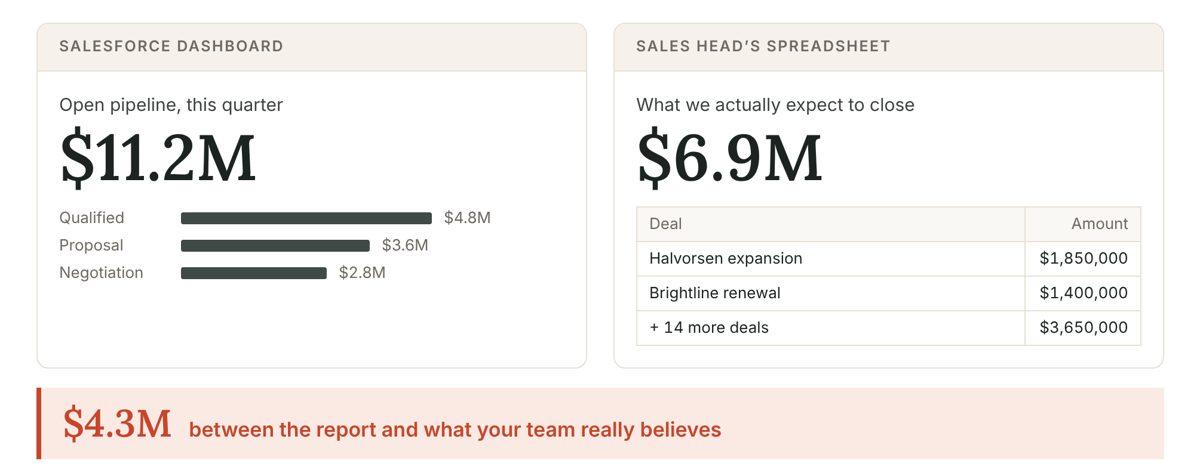
The pipeline review starts, the dashboard goes on screen, and within two minutes someone says "that number can't be right." The rest of the meeting is spent arguing about the data instead of the deals. Soon leaders stop opening Salesforce reports and ask for spreadsheets instead, and the company is back to managing on gut feel.
Sound familiar?
- Leaders ask for a spreadsheet instead of opening the dashboard.
- Two reports that should match show different totals.
- Reports still filter on last year's regions, products or dates.
Next in this section: why it happens, the short-term and long-term fix, the recurring effort, and how the build works…
Keep reading: get the full guide by email
The rest of this section, and all 10 sections, arrive as one PDF in your inbox.
In the free guide, for this problem
- The four reasons reports drift away from reality, and the one most teams miss
- A fix you can start this week, and the change that keeps the numbers right
- The short upkeep routine your admin can own
- Three checks that tell you the numbers can be trusted again
Plus the other 9 problems. 25 pages, free, by email.
Salesforce is a trademark of Salesforce, Inc. The guide is independent and is not endorsed by Salesforce.